




Quick Controls
- Mouse movement and left-click → Aim and shoot. Finish the correction before firing.
- Q → Switch weapon. Compare options within a familiar task.
- Esc → Sensitivity settings. Adjust the setup before another timed attempt.
High Score Tips
- Keep the task unchanged when testing a sensitivity adjustment.
- Use Q with a known purpose rather than switching while searching for a target.
- Read the clock and target task together instead of chasing click speed alone.
Hit as many targets as possible within the chosen task's time limit while testing a controlled weapon and sensitivity setup.
- Developer
- Daniil Vdovin
- Classification
- FPS
About AimLab: Shooting Range
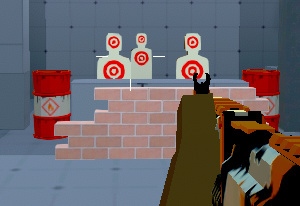
AimLab: Shooting Range is a timed target game by Daniil Vdovin. You choose from training modes or scenarios and try to hit as many targets as possible before the limit. Alongside aiming and firing, the controls include movement, weapon switching, inspection, and sensitivity settings.
Those options make a useful comparison possible. Keep one familiar task, change a weapon or sensitivity setting, and judge whether the sight reaches targets with fewer corrections. Changing both the scenario and setup at once makes the result harder to understand. Use the task's hit count and timing to compare attempts. Check the results screen before relying on any additional accuracy or reaction-time metrics.
How to Play AimLab: Shooting Range
Complete as many successful target hits as possible within the selected timed task.
- Choose the task and read its time-based objective.
- Use Esc to inspect sensitivity before beginning a comparison attempt.
- Aim and shoot through the targets, using Q only when a deliberate weapon test is intended.
- Compare the result in the same task before changing another setting or scenario.
Controls & Timing
The clock makes a miss expensive
A missed shot still needs another alignment. A controlled first movement can leave more time for successful hits than repeated hurried corrections.
A comparison needs a fixed task
Different scenarios can change target presentation. Keep the task consistent when testing the effect of Q weapon switching or a sensitivity adjustment.
Controls
| Input | Action | When to use |
|---|---|---|
| Mouse movement | Aim | Bring the sight onto the next target. |
| Left mouse button | Shoot | Record a hit when aligned. |
| WASD | Move | Use movement where the scenario permits it. |
| Q | Switch weapon | Compare another available weapon. |
| T | Inspect weapon | View the listed inspection action. |
| Esc | Mouse-sensitivity settings | Adjust the setup before another attempt. |
High Score Tips
- Change one variable. Keep the scenario familiar while testing sensitivity or weapon selection. This separates a setup effect from learning a different target arrangement.
- Judge the endpoint of the aim. If the sight passes the target, shorten or adjust the movement before increasing firing speed. A faster inaccurate motion still needs correction.
- Keep inspection out of the timed routine. T is an available weapon action, but inspecting does not advance the target task. Use it when it serves familiarization rather than habit.
- Read the reload prompt independently. The reload key is not confirmed here. Check the in-game controls before a timed attempt so you can respond without searching during the task.
Key Features
- Timed target objective: Successful hits must fit within the task's limit.
- Weapon comparison: Q selects another available option.
- Sensitivity access: Esc opens the relevant adjustment.
- Modes and scenarios: Training context can be chosen before the attempt.
Frequently Asked Questions
Who made this browser range?
Daniil Vdovin is credited for this browser range. An official relationship with the separate Aimlabs training software has not been confirmed.
How do I change weapons?
Q is the listed switch input. Use a familiar scenario when comparing equipment so a different target setup does not hide the effect of the change.
How do I adjust sensitivity?
Press Esc to open the sensitivity settings. Test one adjustment at a time before changing the task as well.
Is R confirmed for reloading?
R has not been confirmed as the reload key for this browser range. Follow the current task's instruction instead of importing the usual binding from another shooter.