






Quick Controls
- WASD or arrows → Move. Keep a turning route around the monsters.
- Mouse movement and left-click → Aim and shoot. Remove the blocking threat.
- Left-click on an upgrade → Select it. Compare the offered benefit before continuing.
High Score Tips
- Choose the upgrade for the difficulty the last room revealed.
- Check a retreat's turn before it reaches a wall.
- Finish the room's threats before treating the portal as the next task.
Clear a block-world room, choose a random improvement, and carry that decision through the next portal.
- Classification
- FPS
About Mine Shooter 3D
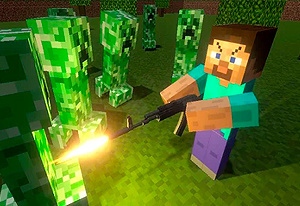
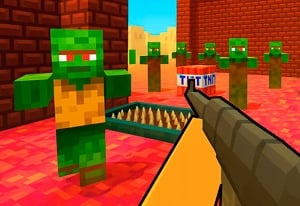
Mine Shooter 3D is a room-clearing FPS set among block-world monsters. Defeating the room's enemies opens the onward portal, and moving between areas introduces random upgrade choices. The equipment decision is therefore part of the run rather than a separate promise that every attempt follows the same build.
Damage, movement or stamina, and firing improvements address different situations. A room where the crowd trapped you suggests another priority from one where you stayed mobile but could not remove a tough target efficiently. Read that difference before choosing the next offer. The voxel appearance supplies the setting, while the actual loop is combat, a selected improvement, and another room.
How to Play Mine Shooter 3D
Clear the enemies in each area, select a useful improvement, and progress through the portal without losing a workable survival route.
- Read the room's shape and identify where the monsters are closing the escape space.
- Move and shoot to reduce the threat blocking the next turn.
- After clearing the area, compare the offered upgrades against the problem encountered.
- Select the improvement and enter the portal, inspecting the next room before repeating the same route.
Controls & Timing
The upgrade offer is a new decision
Random options mean the next room's preparation cannot depend on an improvement not yet offered. Compare what is actually available.
The portal follows the clear
Active enemies remain the immediate task. Do not search for a bypass while the room's combat requirement is unfinished.
Controls
| Input | Action | When to use |
|---|---|---|
| WASD or arrow keys | Move | Maintain a path around approaching monsters. |
| Mouse movement | Aim | Select the threat blocking the route. |
| Left mouse button in combat | Shoot | Clear the room. |
| Left mouse button in upgrade screen | Select | Choose the offered improvement. |
| Space | Jump | Navigate the block environment. |
High Score Tips
- Identify what ended the last route. A closed corner is a movement problem; slow enemy removal is another. Compare the upgrade effects with that cause.
- Keep the next turn visible. Backing away is useful only while there is room to change direction. Read the wall behind the retreat before it becomes the trap.
- Adapt to the offered choices. Do not reserve the whole plan for a specific upgrade that may not appear. Build from the current alternatives.
- Read every new room's geometry. A successful loop in one area may end against an obstacle in the next. Find the first turning point as soon as the portal transition ends.
Key Features
- Room-to-portal loop: Combat completion opens progression.
- Random upgrade offers: Each selection shapes the following area.
- Several improvement roles: Mobility and attack changes address different weaknesses.
- Block-world enemies: The setting differs from a mining or construction sandbox.
Frequently Asked Questions
Can I mine or build like Minecraft?
This entry uses a block-world style but centers on clearing monsters and choosing improvements. Mining, crafting, and free construction are not part of the confirmed loop here.
Should I always choose damage?
Compare it with the cause of the last close call. If enemies trapped the route, mobility or a different path may address the problem more directly.
Are the upgrades offered in a fixed order?
The upgrade choices are random. Use the available offer rather than assuming a particular improvement will be waiting after the next room.
What should I check after taking a portal?
Inspect the new layout and its first turning route. Carry the upgrade's benefit forward without assuming the previous room's geometry is unchanged.